Computer Tips

Anything that does not fit elsewhere can be discussed here.

Moderators: DJKeefy, 4u Network

Post Reply
User avatar
Horus
Egypt4u God
Egypt4u God
Posts: 12363
Joined: Fri Dec 05, 2008 2:15 am
Location: UK
Has thanked: 1658 times
Been thanked: 2213 times
Gender:
United Kingdom

Computer Tips

Post by Horus »

As most of you know I have been rebuilding my new PC and while doing this I did the usual things after getting everything working properly and did a few things that would make life easy should the new system fail. So I thought it may be a good time to either remind you or even advise you to take a few precautions yourselves in the event of a problem with your PC's.

Most Windows Operating Systems can do the following thing, but what I describe here is relevant to Windows 7 that many of you use. When problems occur it can be very frustrating in trying to figure out what is actually wrong. Quite often it happens after we have either loaded on a new program, added a new device, or quite often after some Windows update has been installed. When this happens it is often the easiest remedy to 'Restore' the computer to a time before any of these changes took place and in effect "go back in time". This is not difficult to do and it is advisable to create a 'Restore Point' in Windows, then in the event of a problem occurring you just reset your PC to that point in time when everything was working OK, its as easy as that.

To create a 'Restore Point' do the following:
1. Click on your 'Start' button (bottom left)
2. In the 'Search Programs' box (just above) type in Create Restore Point
3. From the menu that appears select "Create a restore point"
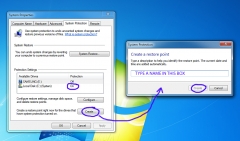
4. You should see a menu as in the picture below this.
7555

5. Look to see that the C:\ drive is set to ON (it usually is) and any other drives (if you have any) are shown as being OFF
6. Simply click the 'Create' button at the bottom and it should open up the small dialogue box as shown to the right.
7. Type a name in the box that tells you which 'Restore Point' it is, use something like 'Restore to April 2016'
8. Now click the Create button to finish, that's it simples!

You will now have created a point on your PC at a time when everything is working to your satisfaction, should you then have a problem some time later you can go back to this point in time. Of course any changes that you have made after this particular restore point will be lost should you go back to it, so the best method is that before making any changes such as adding new devices or drivers or programs to your PC is that you make another 'restore point' and call it something else, you can have many restore points on your PC. ;)


Image
User avatar
Horus
Egypt4u God
Egypt4u God
Posts: 12363
Joined: Fri Dec 05, 2008 2:15 am
Location: UK
Has thanked: 1658 times
Been thanked: 2213 times
Gender:
United Kingdom

Re: Computer Tips

Post by Horus »

Another thing you should do is to create a 'System Repair Disk' as this will help to repair any problems that stop your PC from running properly if some part of the Operating System gets its knickers in a twist, but you must create it while things are running OK. It is quite simple to do and all you need is a blank CD or DVD disk.

1. Click on 'Control Panel' then select 'System & Security'
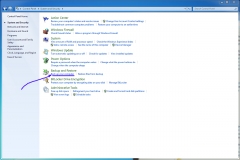
2. From the list choose the 'Backup & Restore, but click on the 'Back up your Computer' just below the bolder text. (see image below)
7556

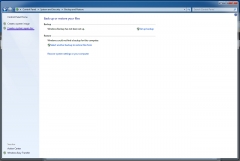
3. This will open another menu (shown below) and all you need to do is to click on the 'Create a system repair disk' text at the top of the left hand column
7557

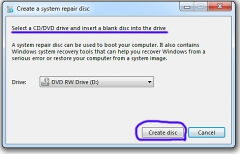
4. At the next small window you will be prompted to insert a blank CD or DVD into your Read/Writer, your CD's drive letter is usually entered in the box for you, so usually you need to do nothing there.
7558

5. Once you have done that just click the 'Create Disk' button to complete the process.

6. Finally label up your disk as 'System Repair Disk' and keep it somewhere safe in case you ever need to use it in the future. :up
Image
User avatar
Kiya
Egyptian Pharaoh
Egyptian Pharaoh
Posts: 4286
Joined: Fri Dec 05, 2008 2:15 am
Location: Peterhead Scotland
Has thanked: 1575 times
Been thanked: 537 times
Gender:
United Kingdom

Re: Computer Tips

Post by Kiya »

Thanks Horus, I have it printed & done.

I wasn't sure where to find it if needed, after searching I found it Control Panel > System > System Protection > System Restore..........not sure if this is the shortest way but, I let it run from 1/4/16, it didn't take long then Shut Down & Rebooted automatically :)

Just saw your second post will get this done also :)
User avatar
Horus
Egypt4u God
Egypt4u God
Posts: 12363
Joined: Fri Dec 05, 2008 2:15 am
Location: UK
Has thanked: 1658 times
Been thanked: 2213 times
Gender:
United Kingdom

Re: Computer Tips

Post by Horus »

Glad you are sorted Kiya :up You didn't actually need to 'run' the restore point after you had created it, although it doesn't matter that you did. ;) It is intended that you run the 'Restore' option if ever you get a future problem with your PC mis-behaving :up
Image
User avatar
Horus
Egypt4u God
Egypt4u God
Posts: 12363
Joined: Fri Dec 05, 2008 2:15 am
Location: UK
Has thanked: 1658 times
Been thanked: 2213 times
Gender:
United Kingdom

Re: Computer Tips

Post by Horus »

You did go to the correct place to find it, the only difference is that you would choose the option of picking another restore point and then select the one that you had just named. Your computer will create these restore points on its own, but if you create one at a time when everything is running OK and give it a name, then you will be able to choose that one at a later date.
Image
User avatar
Grandad
Egyptian Pharaoh
Egyptian Pharaoh
Posts: 6924
Joined: Fri Dec 05, 2008 2:15 am
Location: South East UK
Has thanked: 797 times
Been thanked: 2254 times
Gender:
United Kingdom

Re: Computer Tips

Post by Grandad »

Having not yet used this function on Win10 H you prompted me to check it out. I typed 'Restore' in the search box on the taskbar and a small window opened with the options that you have described for Win7.
Thanks for the memory jog, at least I know it is still there in Win10. :up
:gg:
User avatar
Horus
Egypt4u God
Egypt4u God
Posts: 12363
Joined: Fri Dec 05, 2008 2:15 am
Location: UK
Has thanked: 1658 times
Been thanked: 2213 times
Gender:
United Kingdom

Re: Computer Tips

Post by Horus »

Good :up it is often easy to forget to do these little tasks ;)
Image
User avatar
JOJO
Senior Member
Senior Member
Posts: 385
Joined: Fri Dec 05, 2008 2:15 am
Location: derbyshire uk
Has thanked: 6 times
Been thanked: 2 times

Re: Computer Tips

Post by JOJO »

If you ever get stuck Horus gee us a shout, I'm still as computer savvy ss ever....I spent most of last night looking for a pizza menu I'd downloaded to my phone.....ended up having chhes and crackers instead!
Image
User avatar
Horus
Egypt4u God
Egypt4u God
Posts: 12363
Joined: Fri Dec 05, 2008 2:15 am
Location: UK
Has thanked: 1658 times
Been thanked: 2213 times
Gender:
United Kingdom

Re: Computer Tips

Post by Horus »

:lol: :lol: You still think that a 'Hard Drive' is going to Nottingham on a Saturday :lol:
Image
User avatar
Grandad
Egyptian Pharaoh
Egyptian Pharaoh
Posts: 6924
Joined: Fri Dec 05, 2008 2:15 am
Location: South East UK
Has thanked: 797 times
Been thanked: 2254 times
Gender:
United Kingdom

Re: Computer Tips

Post by Grandad »

Jojo, good to see you.....look in more often ;) :up
:gg:
User avatar
LovelyLadyLux
Egypt4u God
Egypt4u God
Posts: 11596
Joined: Sun Nov 29, 2009 9:12 pm
Location: Canada
Has thanked: 417 times
Been thanked: 2714 times
Canada

Re: Computer Tips

Post by LovelyLadyLux »

JoJo - again a kindred spirit in cyber world!

:ai :ai I see we just got an icon for a computer on here!
User avatar
Kiya
Egyptian Pharaoh
Egyptian Pharaoh
Posts: 4286
Joined: Fri Dec 05, 2008 2:15 am
Location: Peterhead Scotland
Has thanked: 1575 times
Been thanked: 537 times
Gender:
United Kingdom

Re: Computer Tips

Post by Kiya »

Hi JoJo, Still behaving are you :a80: :a59:
User avatar
Horus
Egypt4u God
Egypt4u God
Posts: 12363
Joined: Fri Dec 05, 2008 2:15 am
Location: UK
Has thanked: 1658 times
Been thanked: 2213 times
Gender:
United Kingdom

Re: Computer Tips

Post by Horus »

Kiya wrote:Hi JoJo, Still behaving are you :a80: :a59:
She can't help herself ;)
Image
Post Reply
  • Similar Topics
    Replies
    Views
    Last post
  • Lovemaking Tips for Seniors
    by LovelyLadyLux » » in Just 4 Fun
    2 Replies
    2069 Views
    Last post by LovelyLadyLux
  • My Computer
    by Kiya » » in Suggestions and Help Enquiries
    10 Replies
    7181 Views
    Last post by Grandad
  • NEW COMPUTER?
    by Grandad » » in Hobbies And Pastimes
    5 Replies
    1337 Views
    Last post by Horus
  • Computer experiences.
    by Mad Dilys » » in General Discussions and Rants
    14 Replies
    15306 Views
    Last post by Mad Dilys
  • Bud Abbott and Lou Costello buy a computer
    by LovelyLadyLux » » in Just 4 Fun
    4 Replies
    923 Views
    Last post by HEPZIBAH