


Unpack the zip file and double click setup.exe to install this small program.
After installation run the program by double clicking on the PIXresizer icon on your desktop.
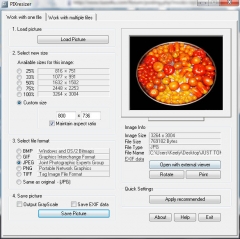
1 - Click Load Picture a browser box will open up where you can browse to where your photo is stored, click on the photo you want to resize and then click open (or just double click the photo)
2 - (Select custom size) Choose Custom Size and make sure maintain aspect ratio is ticked.
If your photo is landscape then enter 1280 into the 1st box, the 2nd box will adjust itself.
If your photo is portrait then enter 1024 in the 2nd box, the 1st box will adjust itself.
NOTE: just make sure that after you have entered the landscape width or the portrait height that the size is no more than width 1280 and height 1024 if it is then just decrease the number you first entered till the size is no bigger that the dimensions above..
3 - (Select file format) - Choose JPEG
4 - Click Save picture (if you want to keep your original photo then rename the filename to something else) otherwise just overwrite your original photo.
Upload your photo to the photo album