Page 1 of 1
PC Colour Codes
Posted: Thu Jan 01, 2015 10:58 am
by Horus
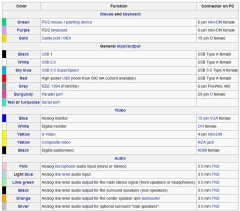
AS we were earlier talking about the colour of sockets for audio cables and where they should be plugged into on a PC or Laptop I thought that I would post this chart which should help you all in the future. It identifies each device that can be plugged into a PC or Laptop (also known as peripherals) and describes the type of plug it has on the end, The colour shown is the colour around that particular connection on your PC or laptop, it is worth saving somewhere for future reference:

Re: PC Colour Codes
Posted: Thu Jan 01, 2015 12:22 pm
by Kiya
Thanks Horus........that will be handy for the future

have it saved
Re: PC Colour Codes
Posted: Thu Jan 01, 2015 6:53 pm
by LovelyLadyLux
I'm going to save it too. Really a pretty good piece of info. Thanks for posting it Horus.
I did just look at my laptop - the one I'm using right now - it is a Toshiba and every hole & port on it is only black!
I know my old desk stop computer has coloured ports and holes but really never noticed that this laptop has none.
Re: PC Colour Codes
Posted: Thu Jan 01, 2015 7:00 pm
by Grandad
Thanks H, really useful and saved for future reference.
Re: PC Colour Codes
Posted: Thu Jan 01, 2015 9:13 pm
by Horus
Like everything in life LLL, some people observe the convention and others dont, but in general you will find that the system works pretty much as described and it may be that your laptop outlets leave no room for confusion. Desktops usually have more peripherals plugged into them such as monitors, seperate speakers, pointing devices etc. whereas in Laptops these are built in, so most peripherals attach via a USB connection which are all the same.